
 By Elson Correia
Let’s continue our adventure through the linked list world by learning how to create double and sorted linked lists.
Video Version of This Article
This post is an improved and more detailed article version of the Linked List Data Structure Series on YouTube that you can check if you prefer videos.
Read Part 1 of this article
This article already assumes you read or is familiar with the intro to linked list article implementation code as it’s based on it.
Part 1 — Intro to Linked List Data Structure
Double Linked List
To put it simply, in a double-linked list, the elements of the list have 2 pointers, next and previous. It allows us to traverse in both directions since the elements know what element comes next and before. On top of tracking the head element, we also track the tail element as well and because of this extra detail, some operations like “push” are faster.
We can create our double-linked list by extending our previous single-linked list so we inherit some other nice methods and capabilities.
class DoubleLinkedList extends LinkedList {
  #size = 0;
  tail = null;

  get size() {
    return this.#size;
  }

  createElement(value) {
    return {value, next: null, prev: null}
  }
}
For this one, we add the tail property to track the last element and for our “createElement” method, it returns an object with the “prev” property pointer.
The first method we will override is the “push” method which adds a new element to the end of the list.
push(item) {
  const element = this.createElement(item);

  if(this.head === null) {
    this.head = element;
    this.tail = element;
  } else {
    this.tail.next = element;
    element.prev = this.tail;
    this.tail = element;
  }

  this.#size += 1;
  return this.size;
}
What is different is that when the list is empty (head equals null) the first element is the head and the tail element.
Once the list has elements, we no longer need to traverse all the way to the last element to insert our new one. Because we have a reference of the tail element, we simply make the current tail element point to the new element, make the new element point back to the current tail element, and finally make the new element the tail element.
Note: This double linked list “push” method has a constant complexity of O(1) and the previous single linked list “push” method has a complexity of O(n).
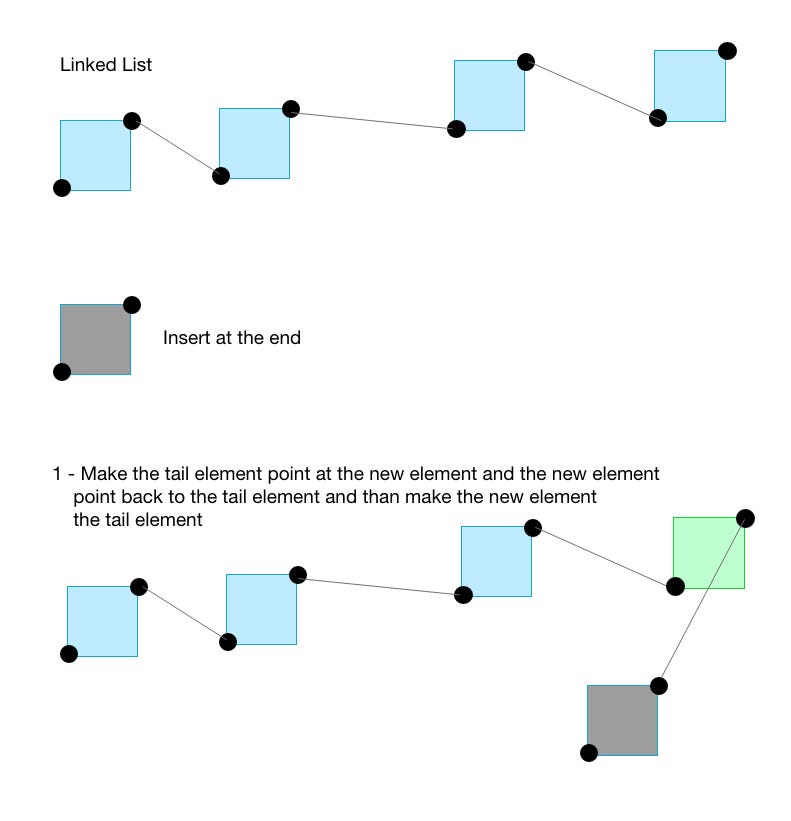
For the “insert” override we only have to do a few changes to take into consideration the “tail” and the “prev” pointer, but it remains mostly the same.
insert(item, index = 0) {
  if (index < 0 || index > this.size) return;

  if(index === this.size) {
    return this.push(item);
  }

  const element = this.createElement(item);

  if (index === 0) {
    element.next = this.head;

    if(this.head) {
      this.head.prev = element;
    } else {
      this.tail = element;
    }

    this.head = element;
  } else {
    let previous = this.head;

    for(let i = 0; i < index - 1; i++) {
      previous = previous.next;
    }

    element.next = previous.next;
    previous.next.prev = element;
    previous.next = element;
    element.prev = previous;
  }

  this.#size += 1;
  return this.size;
}
The first change is for when inserting at the beginning. If there is a head element(the list is not empty), we need to make the current head element point back to the new element since it will become the new head. Otherwise, we need to define the tail using the element.
The second change is to make the element that comes after the previous element point back to the new element and the new element point back to the previous element.
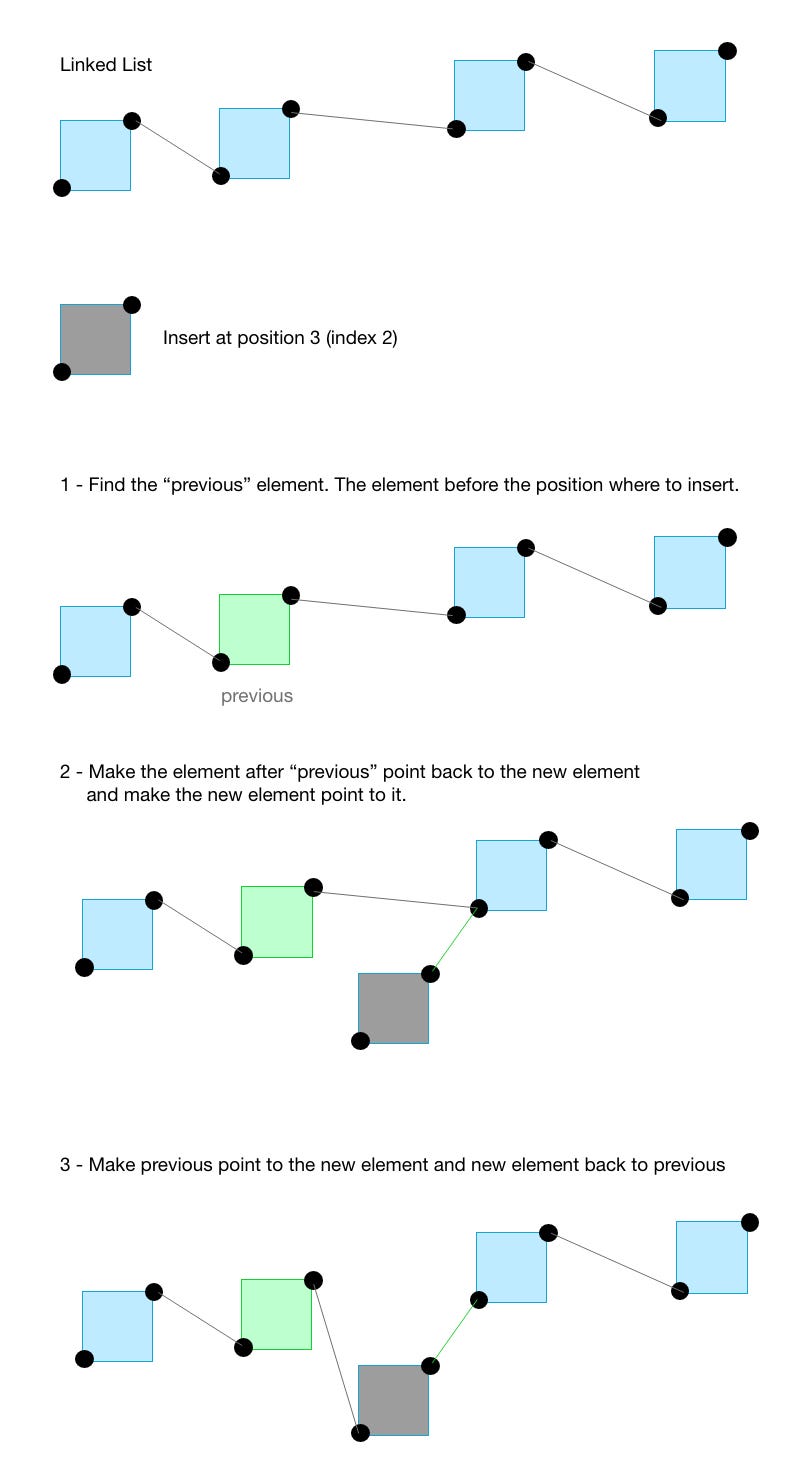
The final method we need to override is the “remove” method. The change is also small and it is all about reverting what we did in the “insert” method.
remove(index = 0) {
  if (index < 0 || index >= this.size) return null;

  let removedElement = this.head;

  if (index === 0) {
    this.head.next.prev = null;
    this.head = this.head.next;
  } else if(index === this.size - 1) {
    this.tail.prev.next = null;
    this.tail = this.tail.prev;
  } else {
    let previous = this.head;

    for(let i = 0; i < index - 1; i++) {
      previous = previous.next;
    }

    removedElement = previous.next;
    previous.next = removedElement.next;
    removedElement.next.prev = previous;
  }

  if(!this.head || !this.tail) {
    this.head = null;
    this.tail = null;
  }

  this.#size -= 1;
  return removedElement.value;
}
The first change is to make the element after the head(second element) point back to null since it will be the new head if removing the first element. The second change is for when removing the element at the end which we make the element before the tail element point to null and make it the new tail.
The final change is to make the element after the one we are removing point back to the “previous” element when removing anywhere in the middle.
Source Code: Check this full code on Github
Sorted Linked List
There is a big difference between sorting a linked list and creating a sorted linked list. A sorted linked list is a linked list that is always sorted and the sorting happens when adding new elements to the list. To sort a linked list is pretty much adding a “sort” method that sorts the list in place or returns a new sorted linked list.
Let's create a sorted linked list and you can extend any linked list for this, a single or a double, and since we just implemented a double one, let’s extend that.
class SortedLinkedList extends DoubleLinkedList {
  #sortingFunction;

  constructor(sortingFunction = null) {
    super();
    this.#sortingFunction = sortingFunction;

    if(typeof sortingFunction !== 'function') {
      this.#sortingFunction = (a, b) => {
        if(a === b) return 0;

        return a > b ? 1 : -1;
      }
    }
    this.push = undefined;
  }
}
A couple of things are happening here. First, we need a sorting function, and the one we will use uses the same concept of the array “sort” method callback. You must provide a custom sorting function that follows the same rule or a default one is created.
Also, notice that we set the “push” method to “undefined” since in a sorted list, adding an element to the end makes no sense.
The only method we will override is the “insert” method. If the list is empty we simply call the “insert” method in the parent class through the “super” keyword. That will add the first element.
insert(item) {
  if(this.size === 0) {
    return super.insert(item);
  }

  const index = this.#getNextElementIndex(item);

  return super.insert(item, index);
}
For anywhere else in the list we need to know at which position to add the new element so the list is always sorted. For that, we have the “#getNextElementIndex” private method that takes the item and figures out an index which we then use to call the “insert” method on the parent class.
The “#getNextElementIndex” method looks like this.
#getNextElementIndex(item) {
  let current = this.head;
  let i = 0;

  for(; i< this.size; i++) {
    const res = this.#sortingFunction(item, current.value);
    if(!(res >= 0) || !res) return i;
    current = current.next;
  }

  return i;
}
It will go through each element and compare whether it is greater, equal, or less than the new item. As soon as it finds out that the new item is less than the current item, it returns the index of that item at which the new item will be inserted at.
We know the new item is less if the sort function returns a negative number or a “falsy” value.
const list = new SortedLinkedList();
const list2 = new SortedLinkedList((a, b) => b - a);

// insert same values for both
list.insert(50);
list.insert(10);
list.insert(40);
list.insert(20);
list.insert(30);
list.toString(); // '10, 20, 30, 40, 50'
list2.toString(); // '50, 40, 30, 20, 10'
If we were to add a “sort” method to the list instead of creating a SortedList class, it would still use the same logic but the limitation would be having to sort it every time after making new insertions or removal.
You can use a binary tree to represent a linked list and it would probably feel very similar to this with the advantage of balancing the tree to make it even more performant. We can leave the tree data structure for another video.
Source Code: Check this full code on Github
Next
Read the third part of this article where you will learn about how to create a circular, and reversed linked list.

YouTube Channel: Before SemicolonWebsite: beforesemicolon.com