
 By Elson Correia
Basic curriculum to become a web developer for free.
Whenever you research for a strategy to learn web development the number one piece of advice on the list is to learn the basics first. Understandable but, how does one go about it?
To be honest, I am often going back to relearning the basics from time to time and I have been programming professionally for a long time and have built dozens of web projects in my career;
HTML, CSS, and Javascript
Asking someone to learn HTML, CSS, and Javascript — especially in that order — is not a piece of good advice. You should be jumping from one to the other based on topics always revisiting the basics.
It is also fine to skip some topics entirely until you acquire some other knowledge and it is terrible advice to ask someone to try to “Master” any of those 3. Nobody has ever mastered those. It is almost impossible and unnecessary.
The Learning Web Development noise
There are actually many ways to get into web programming and different things fit different people. I have seen people starting from frameworks back to the basics and vice-versa. The best thing about it is that all this information is available online for FREE.
There are a lot of trends and there is always something new to try with many tools promising to help you that come in and out of popularity. Focusing on roadmaps can be overwhelming and I believe in having a good start and letting the rest happen naturally and driven by your desires and curiosity.
I will be sharing with you a similar approach I used years ago when I started with the only difference being that you don’t have to spend any money on getting the info.
My Journey
I learned HTML by reading the book “HTML and CSS” by Shelly Cashman and from there I read the book “Web Development and Design Foundation with HTML5” by Felke Morris. They are pretty nice books to start with. The content was made simple and they really introduced the HTML basics nicely and in a fun way.
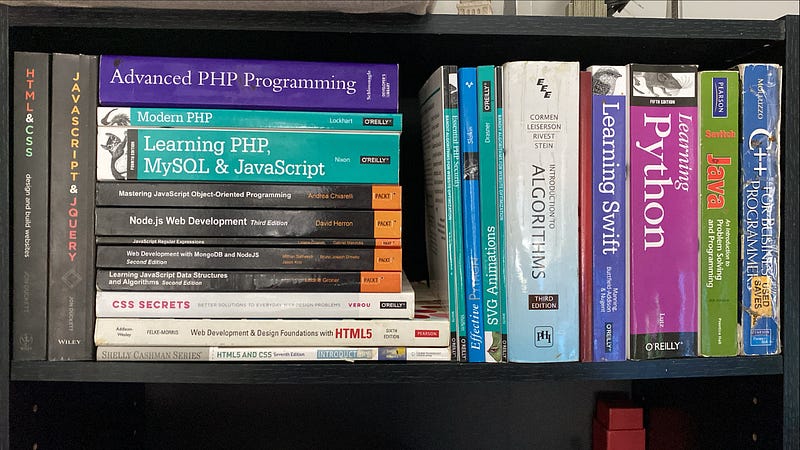
Some of the programming books on my bookshelf including the books I just mentioned and all the others that made my career.
By the way, this was after years of working with C++ and Java. I was just getting into the world of PHP and I was definitely not new to programming in general but Web development was a whole new space for me.
I then quickly moved to the world of Jon Ducket with the famous books on HTML, CSS, and Javascript including jQuery. These were fun to explore as they introduced me to the fundamentals of CSS and HTML and the idea of creating fun, interactable pieces (loose components) like sliders, tabs, mouse-based UI, etc.
Although they are fun, I don’t program like that anymore and jQuery is not popular anymore. For sure there is a better way to build UI Components now but these books had a huge impact on how I approached web development and got me hooked from the start.
After that, I occasionally bought books but was more into exploring APIs documentation and experimenting on my own. I watched videos online, had a Lynda.com (now LinkedIn Learning) subscription and I was watching tutorials non-stop.
I was practicing almost every day and built a lot of projects and deciding what to put on my portfolio became a real problem. All these before I landed my first Web Developer job after going through almost 30 interviews in one month.
I landed my first job with CSS, HTML, and Javascript (and jQuery) knowledge only. The job required AngularJs(version 1) knowledge which I quickly learned by going through tutorials over the weekends. The rest is history.
So, if I were to start my web development career today, here is how I would approach it.
So how do you learn the basics?
One thing is for sure, start with HTML. Don’t just try to learn it all, as most of it you won’t need right away. You also don’t need to buy any books as you can find everything for FREE online.
1 — HTML Basics: Learn about the anatomy of HTML tags and documents. Understand the idea of nesting tags and the difference between open-closed and self-closing tags. Learn about links and adding images to the page. Really understand what HTML is meant for which is to markup text.
Don’t wait to learn more to start building. Just with the HTML basic knowledge, you should be able to start building websites. Most newbies want to move fast and start making flashy stuff but they quickly get demotivated when finding out how hard it can be.
You can build a simple website with multiple pages, including images and nice content. This will teach you to appreciate a website in its basic form and really emphasize the importance of focusing on content.
2 — Learn by Topics and project needs: Let your need drive you. After you build a basic project now try to add things and when you don’t have the know-how, research and discover on your own.
This is the best way to learn HTML. Try to create a website for a fictional(or real) business of yours for example. Really focus on writing good content and split it into different pages.
All of a sudden you want to add a navigation menu, a form, now a video, etc. Let that need drive you and go find out how to accomplish just that. Dont try to make it fancy but when you come across the documentation, really learn it.
Try to understand and experiment with that particular topic as much as you can. Here are some great topics of documentation you should learn FIRST:
- Emphasizing text and handling abbreviations;
- Proper content structure and semantics;
- Lists and descriptions lists:
- Navigation menu and creating links between pages;
- Videos and Audio content;
- Images;
- Web Forms and how to create your first form:
- Tables:
- Inline vs block elements in HTML;
This is just the tip of the HTML iceberg but really learn these topics first and don’t get distracted by anything else.
3 — CSS Basic: Now you should try to learn how to add a little bit of style to your project and have fun with it. You should learn about:
- CSS, how it is structured, and how to style HTML elements;
- The normal flow of HTML elements;
- Inline style vs style tag vs external stylesheets;
- Understand color and adding color to HTML with CSS;
- How to style text;
- How to style links;
- How to style lists;
- How to style background and borders;
- The box model;
- Working with margins;
- Take a quick glance over CSS selectors types and combinators;
- How CSS works and the Cascade of CSS;
Learning this should allow you to add a nice style to your content built on basic HTML. Don’t rush things from here and don’t try to master anything. At this level, you should try to make documentation your best friend and build as many simple pages as you can with a basic style.
4 — HTML Semantics and Layout: understanding layout and the semantics behind it will help you group your content into blocks that are much easier to manage and handle. At this level, you should take a look at:
- Website structure and semantic layout;
- Difference between
[div](https://www.youtube.com/watch?v=swWeWesZVZU),[section](https://www.youtube.com/watch?v=swWeWesZVZU), and[article](https://www.youtube.com/watch?v=swWeWesZVZU)tags; - Difference between
[img](https://www.youtube.com/watch?v=xDFNvEwPYYY)tag and CSS background image; - Difference between
[main](https://www.youtube.com/watch?v=lVmX-7XEyd4),[header](https://www.youtube.com/watch?v=lVmX-7XEyd4),[footer](https://www.youtube.com/watch?v=lVmX-7XEyd4)and[aside](https://www.youtube.com/watch?v=lVmX-7XEyd4)tags; - Difference between
[figure](https://www.youtube.com/watch?v=Xn5_gDQFyJg),[img](https://www.youtube.com/watch?v=Xn5_gDQFyJg)and[picture](https://www.youtube.com/watch?v=Xn5_gDQFyJg)tags; - The impact of SEO (Search Engine Optimization) and what it is;
At this level, you should understand how to structure the layout with HTML. It is very important for you to try different ones and really dig into the semantic tags. This is the most important aspect of HTML5 and a game-changer for web development and SEO.
5 — CSS layout styling: after learning how to structure layouts with HTML it only makes sense to learn how to style them. At this level it is all amount moving boxes so you should focus on learning:
- How to use Flexbox;
- How to create multi-column layouts;
- How to use Grid layout;
- How to work with
[::before](https://developer.mozilla.org/en-US/docs/Learn/CSS/Howto/Generated_content)and[::after](https://developer.mozilla.org/en-US/docs/Learn/CSS/Howto/Generated_content)pseudo-elements; - How to center things;
At this level simply try to accomplish things by building different layouts. This is a very fun level and doesn’t try to master anything. Instead, become familiar with documentation for later reference.
I still don’t understand the whole flexbox and grid layout thing and I reference their documentation all the time. To be honest, when I learn web development there were no Flexbox and Grid. My thing was CSS [float](https://developer.mozilla.org/en-US/docs/Web/CSS/float) and I still use it out of old habits.
For CSS flexbox and grid, I have a handful of properties I use all the time and it is rare that I use the more complex stuff and when it becomes the case, I always check the documentation again. No rush, no pressure, and always having fun.
6 — Responsive design: one of the things that make web programming complex is the fact that you need to consider various browser types, versions, and sizes and responsive design will teach you all about that;
- How to build a responsive website;
- Media queries and how to use them;
- Responsive images;
- Responsive text;
- CSS units and values;
7 — Javascript Web fundamentals: Javascript itself is a huge topic but for basic programming, you only need to learn enough to start working with the things on the page so you should try to learn about:
- Basic Javascript for Web development;
- How to build a logic-based UI project;
- Working with variables;
- Working with Strings;
- Basic array knowledge;
- Working with DOM elements;
Javascript is forever changing and you should always try to learn a little more as you get stuck. It is very important to learn Javascript without any third-party (things people build that you can use) distractions so you really understand it.
I do believe you will quickly fall in love with Javascript and start having fun as soon as you see things working.
That’s it!
As you may be thinking, the basics are a lot of stuff. In fact, I do believe that web programming is one of the most complex forms of programming to learn because there is a lot of stuff to cover. Web programming is super complex and there are even more things to consider
This is just the very tip of the iceberg so please don’t get distracted by any trend and cool stuff you see out there. Focus on learning these on your own. It is FREE and it turned me into the engineer I am today. I believe you can do it too.
The key here is to not get distracted by anything else. You can always learn the next.
What comes after the basics?
Just learning the basics is already a lot. You should not worry about anything but practice all you learned and try different things.
Some developers after learning the basics try to recreate popular websites with CSS and HTML only. Others try to put together at least one website a week. I created a lot of websites as practices and I recommend you come up with ideas on your own and really lock yourself in practicing everything for at least 3 months almost every day.
Yeah, every day. Although I do know life can get busy so try your best to fill every free available time with learning practices.
There are more advanced topics like animations and positioning, web components, OOP, Web APIs, Client libraries and frameworks, etc.
Truth is, with strong basics and a lot of practice, jumping into any advanced topic will feel much easier and you will have fewer headaches. I know that because that's how thankful I am for dedicating myself to the basics early on.
I wish you luck and feel free to reach out for extra help.

YouTube Channel: Before Semicolon Website: beforesemicolon.com