
 By Elson Correia
Everything about Graph Data Structure with JavaScript
The graph data structure helps us create so many powerful things that the likelihood of you using something which makes use of this non-linear data structure is high. It is used whenever there are multiple and complex connections between data points which makes it perfect to represent Maps, Networks, and navigation systems.
Video Version of This Article
This post is an improved and more detailed article version of the Graph Data Structure Series on Youtube that you can check if you prefer videos.
What is a Graph?
A graph is a non-linear abstract data structure which pretty much means it is defined by how it behaves and not by an underline mathematical model.
It consists of a set of nodes — also known as vertices — connected by edges(lines). If these edges have the direction the graph is said to be a direct graph and if the edges go both ways we say that the nodes are strongly connected.
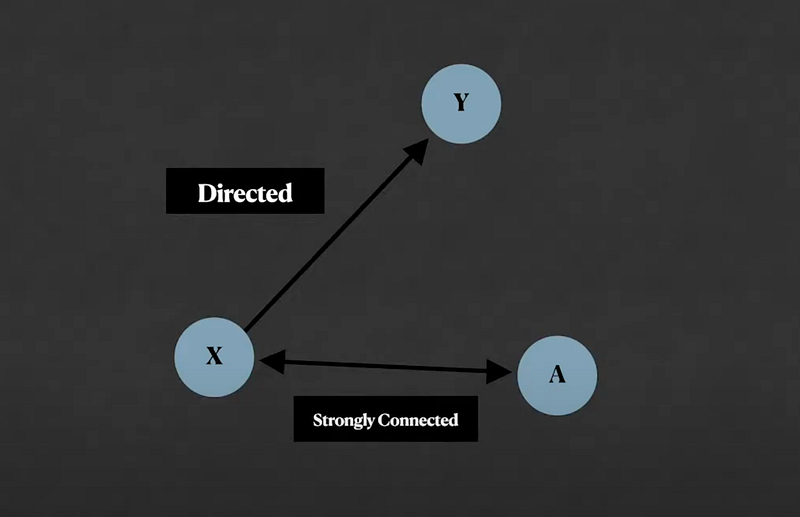
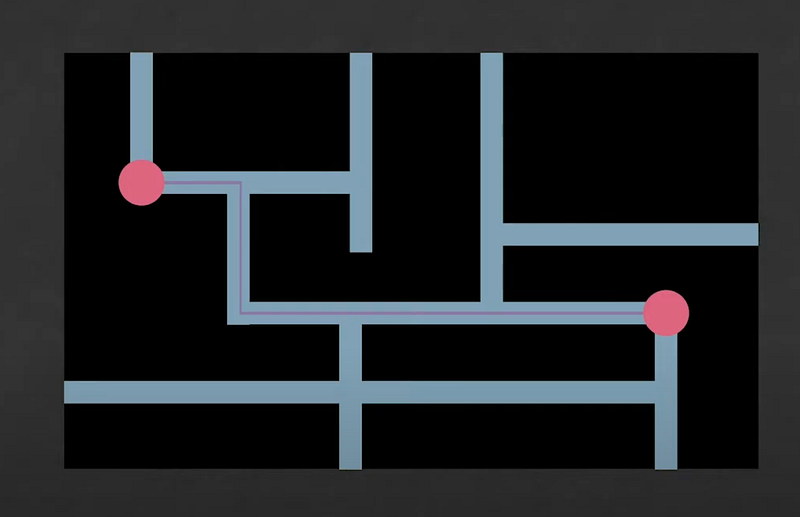
Edges can also have weights which pretty much means that the edges have value and this type of information is great when you are representing a map, for example. If we think of edges as roads and locations on the map as nodes, we can give these edges distance values so we can know how far a node is from another by adding the value of the edges in between them.
When to use graph data structure?
In a list data structure, you have a sequential order of items which requires you to go from item to item till you reach the one you want. In a hierarchical data structure like Trees, you have a parent-child relationship that allows you to make decisions on which subtree to navigate to. In a graphical data structure, you have neighborhoods.
An item — a node — in a graph is only aware of the nodes it connects to and those nodes connect to more nodes and so forward. This type of complex relationship is the main characteristic that the data needs have to require to be represented as a graph.
Some examples of things that can be represented with a graph are GPS systems and maps which connect many points together and can help determine how to get from one point to another and how long or far it is.
Social networks use people as nodes and can be represented with a graph to help find out of how many common friends or interests two people may have in common by checking who these are connected to for example.
The internet is one big graph and the way Search Engine determines how websites are connected to each other is by using graphs.
Whenever there is a complex connection of things that are non-linear or hierarchical there is a need for a graph. To make it even more clear, a linear data structure has a start and ending node, a hierarchical has a start node, and many ending nodes depending on the path you follow. A graph has multiple starting and ending nodes so if your data follows this pattern, you may need to use a graph.
Simple Graph Implementation
A graph is used to represent complex data relationships but the graph implementation itself is very simple.
One thing you may need to understand is the concept of a matrix and adjacency lists. For example, this simple graph below can be represented using an adjacency matrix or list or even an Incidence matrix depending on which type you are trying to represent and what you want to do with it.
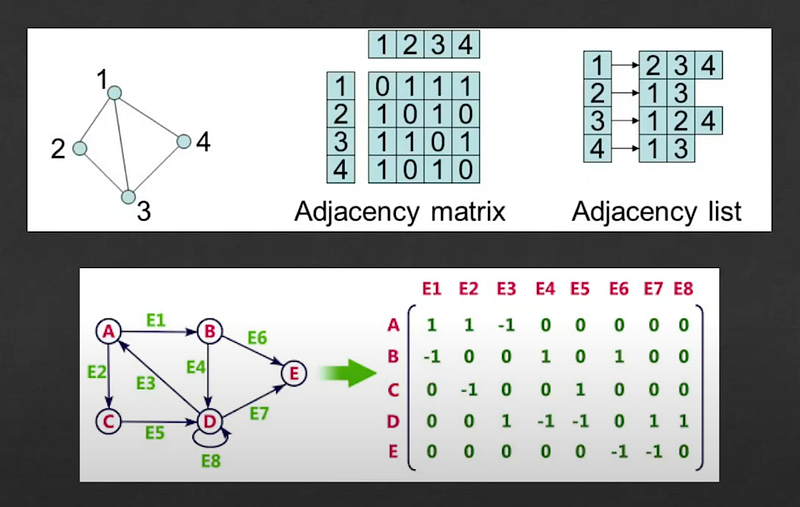
- An adjacency matrix is like a table that uses 1 to signal that the nodes connect and zero to signal that they don't. This method is great to represent finite graphs.
- Adjacency List is like a dictionary in which each node value is a list of all the nodes it connects to. This is a different method used to represent finite graphs which are faster and easier to work with.
- The incidence matrix is also like a table but instead of tracking whether two-node connects or not, it tracks the direction of the edges where 1 is for when it uses the edge to connect to others, -1 is for when an edge connects to it, and zero when it has no connection with that edge. This method is perfect when you have edges with direction and value(weight) which makes it perfect for representing maps and navigations systems.
For this graph implementation ill be using the adjacency list for simplicity and the graph I'll show you is general-purpose and unweighted.
We will start by declaring a graph class with private vertices list which uses a set data structure to ensure it cannot contain repeated edges — also, a private adjacent list that uses the map data structure to track node connections.
class Graph {
  #vertices = new Set();
  #adjacentList = new Map();

  get vertices() {
    return Array.from(this.#vertices)
  }

  get adjacentList() {
    const list = {};

    this.#adjacentList.forEach((val, key) => {
      list[key] = Array.from(val)
    })

    return list
  }
}
Since these are private, I used getters to return them where I first convert them into array and JavaScript objects since these are much easier and commonly used. It also prevents these private values from being changed from the outside.
Next, we need a way to add vertices.
class Graph {
  ...
  addVertex(vertex = null) {
    if(
     !this.#vertices.has(vertex) &&
     vertex !== null &&
     vertex !== undefined
    ) {
      this.#vertices.add(vertex);
      this.#adjacentList.set(vertex, new Set());
    }
  }
}
All this method does is make sure a vertex is not nil and was not added before. It then adds it to the vertices list and to the map with an empty Set as a value.
Now we need a way to add edges.
class Graph {
   ...
   addEdge(vertex1 = null, vertex2 = null, directed = true) {
     if(
       vertex1 !== null && vertex1 !== undefined &&
       vertex2 !== null && vertex2 !== undefined &&
       vertex1 != vertex2
     ) {
       this.addVertex(vertex1);
       this.addVertex(vertex2);
this.#adjacentList.get(vertex1).add(vertex2);
       if(directed) {
         this.#adjacentList.get(vertex2).add(vertex1);
       }
     }
   }
}
What this is doing is first make sure the 2 vertices are different from each other and not nil. After, we add them both to the vertices list which already checks if the vertices are in the list before adding them. It wraps up by adding the vertex2 to the vertex1 adjacent list which pretty much means vertex1 connects to vertex2 and if it is directed it also makes vertex2 connect to vertex1 in a bi-directional connection.
With that, the graph has everything we need to do anything we want.
Breadth-First Search
Whenever you have a data structure of any kind there is a need to search for the items — in this case, nodes. One of the ways to search a node in a graph is to use the Breadth-first search.
This type of search or traversing is especially known in the tree data structure world but tree traversal is a type of graph traversal.
For this graph, we will use the concept of colors to track whether we are done checking a node adjacency list or not and to avoid visiting a node more than once for efficiency.
The concept is simple, by default all nodes are green, when you check a node it becomes yellow and when you visit all its adjacent nodes it becomes red.
const COLORS = Object.freeze({
  GREEN: 'green',
  YELLOW: 'yellow',
  RED: 'red'
});
When you do a breadth-first search you check all its adjacent nodes and while you check you create a queue of nodes to check next.
Note: whenever check is mentioned it simply means it is reading the node value. When visit is mentioned it means we are checking its adjacency node list.
The following function takes a graph — the one we just implemented — and the vertex to start looking from as well as a callback function that will be called whenever we check a node.
function breathFirstSearch(graph, fromVertex, callback) {
  const {vertices, adjacentList} = graph;

  if(vertices.length === 0) return;

  const color = vertices
      .reduce((c, v) => ({...c, [v]: COLORS.GREEN}), {});
  const queue = [];

  queue.push(fromVertex);

  while(queue.length) {
    const v = queue.shift();
    const nearVertex = adjacentList[v];
    color[v] = COLORS.YELLOW;

    nearVertex.forEach(w => {
      if(color[w] === COLORS.GREEN) {
        color[v] = COLORS.YELLOW;
        queue.push(w);
      }
    });

    color[v] = COLORS.RED;

    callback && callback(v);
  }
}
It starts by deconstructing the vertices and adjacent list which will be an array and an object since that's what we defined them in the getters. If there are not vertices it returns without doing anything. We follow by coloring all nodes green which is pretty much a map of the vertices to color so we can easily query what color is the node as we go.
The queue is to track which vertex to visit next and from start, the vertex provided is the first to be visited. Check the queue data structure article to learn how it works.
While there is something in the queue we will shift the queue to grab the vertex at the front, grab its adjacent list of nodes, and color it yellow as we already checked its value. Each vertex looped over is queued to be visited next and we color them yellow as long as they are green.
Since we checked all vertex adjacent lists, we can color it red since it is fully visited and call the callback with its value. By this point, we should have something in the queue and the process continues if so.
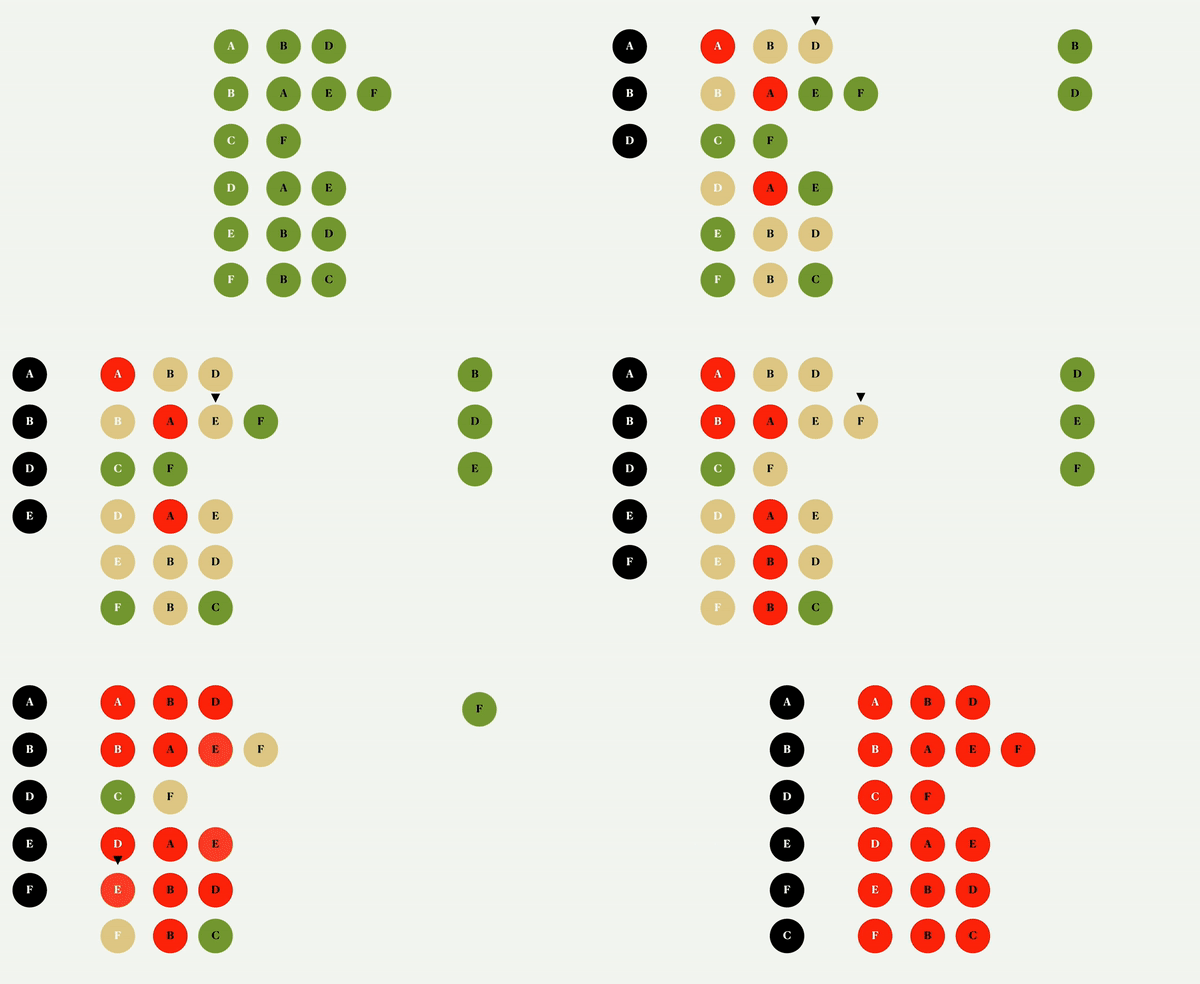
Colored Graph BFS with a queue on the right and visiting order on the left. video
Depth First Search
The depth-first search algorithm works a little differently. Instead of checking all adjacent list nodes before visiting the next node in the queue, it visits the node as soon as it checks it using a stack data structure to track which node to check next.
The same color concept is used here and the implementation is based on recursive function instead of a while loop used in the breadth-first search algorithm. It looks something like this:
function depthFirstSearch(graph, fromVertex, callback) {
  const {vertices, adjacentList} = graph;

  if(vertices.length === 0) return;

  const color = vertices
     .reduce((c, v) => ({...c, [v]: COLORS.GREEN}), {});

  callback && callback(fromVertex);
  color[fromVertex] = COLORS.YELLOW;

  function visit(v) {
    if(color[v] === COLORS.GREEN) {
      callback && callback(v);
      color[v] = COLORS.YELLOW;
      adjacentList[v].forEach(visit);
    }
    color[v] = COLORS.RED;
  }

  adjacentList[fromVertex].forEach(visit);
}
The function takes the same arguments and does the same checks and color setup as the breadth-first search function. After coloring all nodes green, it calls the callback with the first vertex then proceeds to color it yellow as it is checked at this point.
It declares a visit recursive function which is called for each current vertex adjacent node. This visit function checks if the node is green — not checked or visited, calls the callback with it, colors it yellow then grabs its adjacent list and for each, it calls itself again.
It only gets to color the node-red after it is done checking all its adjacent list nodes and their adjacent list nodes and so on. It goes deep first before it is done with the node and that's why it is called a dept-first search algorithm.
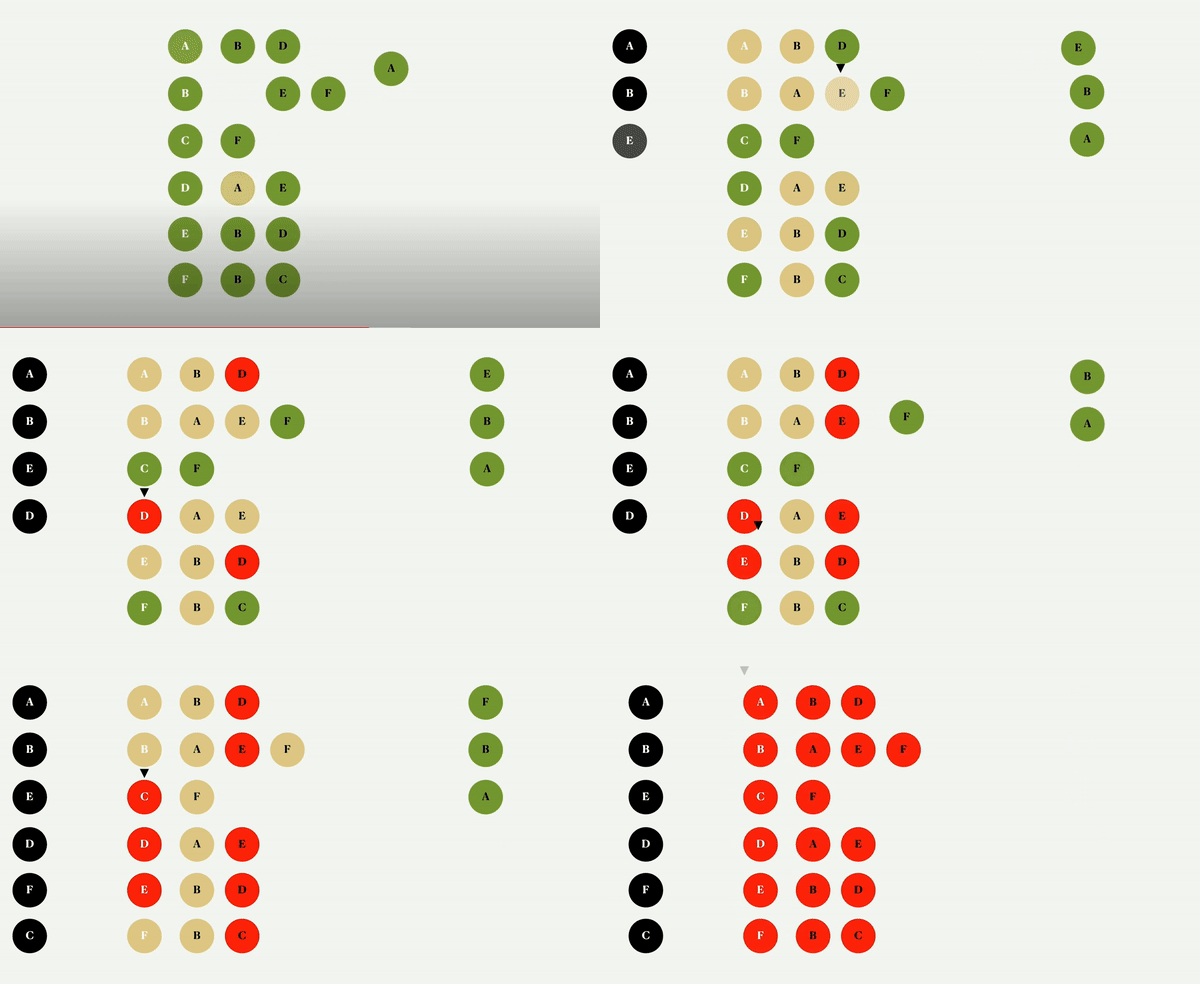
Colored Graph DFS with a stack on the right and visiting order on the left. video
Conclusion
As a developer, it is essential for you to become familiar with all the different data structures and understand how to work with data to take your career to the next level. To go along with it, being able to apply different data structure algorithms requires a different way of thinking in order to solve any programming problem.
The graph data structure is one you should understand — at least the basics — as it is a hard one to avoid as you get better as a developer. It forces you to think in terms of data and its relationship and can be applied in almost anything to create something great. Hopefully, I was able to help here.
Introduction to the Tree Data Structure in JavaScript *Everything about the tree data structure in JavaScript.*javascript.plainenglish.io

YouTube Channel: Before Semicolon Website: beforesemicolon.com