
 By Elson Correia
There are common design patterns that you can use that will improve your code substantially. These are techniques to simplify and better structure your code in a way that makes it reusable, modular, easier to consume and test, as well as speed up your coding process.
Types of Patterns
There are three(3) types of patterns. Creational, structural, and behavioral.
- Creational — Addresses problems related to creating objects.
- Structural — Addresses the relationship between entities and how together they can compose a larger structure.
- Behavioral — Addresses how objects communicate and interact with each other.
Factory Pattern
This is one of the most common creational design patterns and one of my favorites when it comes to creating objects. It allows you to separate the implementation from the creation details of a particular object by abstracting away any complexity related to interacting with a particular API.
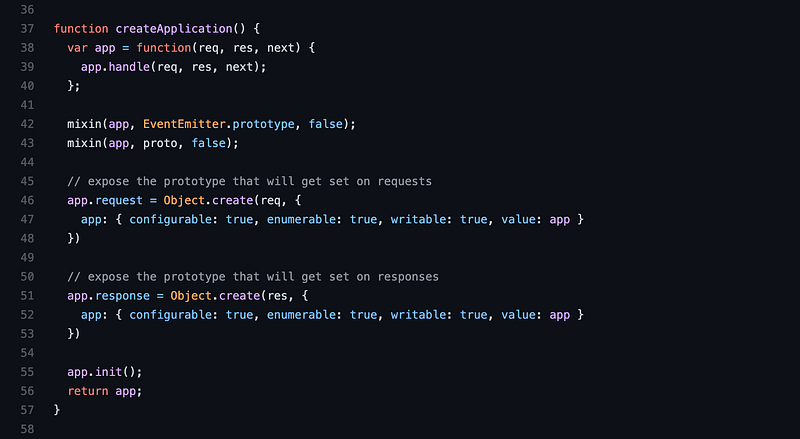
Another thing it allows us to do is to create an object whose class or constructor is only known at runtime. If you ever used Express.js for Node you used its app factory(createApplication) when you created the express app. The constructor that creates the app for you is created at runtime and the factory exposes just enough stuff for you to interact with it.
const express = require('express');
const app = express();
Below is what the express app factory looks like on the surface. It has its internal APIs that take care of different things and then when you request an app it then goes ahead and assembles your object — hence the name factory — and returns what you asked for.
The advantage of that is you always have the same way to create the app and they can change the internal part however they like and you never need to know about it.
Observer Pattern
If you ever used RxJs you already felt the power of the observer pattern. What it allows you to do is, well, observe another object. With this pattern, you have the Observable which is the object that handles the observing that consumes an Observer which does all the notifications.
Surprisingly, you can create an observable in a couple of lines of code:
function Observable(observer) {
  this.subscribe = (...fns) => {
    if(observer) {
      const obs = new Observer(...fns);
      observer(obs);
    }
  };

  this.unsubscribe = () => {
    observer = null;
  }
}
where the Observer can look something like this:
function Observer(
  onNext,
  onError = () => {},
  onComplete = () => {}
) {
  const def = () => {};

  if (typeof onNext === 'object') {
    onError = onNext.error || def;
    onComplete = onNext.complete || def;
    onNext = onNext.next || def;
  }

  this.completed = false;
  this.withError = false;
  this.next = (val) => {
    if (!this.completed) onNext(val);
  };

  this.error = (err) => {
    if (!this.completed) {
      this.completed = true;
      this.withError = true;
      onError(err);
    }
  };

  this.complete = () => {
    if (!this.completed) {
      this.completed = true;
      onComplete();
    }
  };
}
which then you use it like so:
const obs = new Observable((observer) => {
  observer.next(10);
  observer.next(20);
  observer.complete(new Error());
  observer.error(new Error());
})

obs.subscribe({
  next(value) {
    console.log('next', value);
  },
  error(err) {
    console.log('err', err);
  },
  complete() {
    console.log('complete');
  },
});

obs.unsubscribe();
The RxJs team has a more elaborated implementation which also involves pipes/operators and other features like a scheduler and so much more.
Module Pattern
If you ever used NodeJs then you already know the module pattern. The same goes for many client libraries used to build your web app.
The module pattern allows you to encapsulate functionally and organize code in modules — parts that make your application. In NodeJs, when you create a file and dump your code in there, on execution your code is wrapped in a module using the IIFE (Immediately Invoked Function Expression) that looks like this:
(function(require, global, exports, module, __dirname, __filename) {
  // your Node code is placed here
})();
…where require, global, module, exports, __dirname, and __filename are objects that are injected into your module that you can access to expose your code or import code from other files as well as access global information of the environment.
In the browser you can create something like this:
const globalData = {
  x: 20
};

const myModule = (function(global) { // <- access injections
  // private stuff in the module
  const val = 10 + global.x;
  // expose what you want
  return {
    prop: 12,
    method() {
      return val;
    }
  }
})(globalData); // <- inject into your module

console.log(myModule.prop); // prints 12
console.log(myModule.method()); // prints 30
The module pattern is perfect for grouping logic related to a specific feature with the advantage of hiding or controlling what can be accessed from the outside.
A module does not even need to return anything. You may pass it some data and it will execute it in its own ecosystem continuously which can be great for when you need to react to a bunch of events.
Proxy Pattern
The proxy pattern introduces you to a new type of programming called metaprogramming.
Javascript comes with the Proxy object which literally gives you superpowers and pushes you to the next level. It helps you control access to another object — called subject —by implementing the same interface. The Proxy helps you intercept operations to the subject which makes it great for:
- Validation — validate data to the subject to make sure it is valid before it reaches the subject;
- Security — ensures that any access to the subject is authorized and the one doing it has all necessary privileges;
- Caching — keep an internal cache to make future expensive operations do not go through the expensive calculation in the subject;
- Lazy initialization — ensure that expensive initialization of the subject is delayed for when it is actually needed;
- Debugging/Logging — intercept all the data in and out to create a realistic report of usage of the subject;
- Remote Object Access — makes remote objects appear local;
The proxy pattern deserves a post of its own and by far it is my favorite of all patterns and super fun to work with.
It can be used with the third-party API or library to ensure things are checked and handled beforehand or that the results coming out has a certain format your application needs. This is a great way to patch or extend third-party libraries without having to touch their code.
Let's take a look at a simple validator to ensure the age of the person is set with a valid value anytime.
let validator = {
  set: function(obj, prop, value) {
    if (prop === 'age') {
      if (!Number.isInteger(value)) {
        throw new TypeError('New age value is not an integer');
      }
      if (value > 150) {
        throw new RangeError('New age value is too high');
      }
    }

    // The default behavior to store the value
    obj[prop] = value;

    // Indicate success
    return true;
  }
};

const person = new Proxy({}, validator);

person.age = 100;
console.log(person.age); // 100
person.age = 'young';    // Throws an exception
person.age = 300;        // Throws an exception
Facade Pattern
This is a simple pattern used to shield you from complex API or to unify multiple separate APIs. If you ever used jQuery then you have used a Facade before. jQuery is a facade for the complex DOM API and it simplifies all the complexity of working with DOM by exposing the same API which is easier to reason with.
So, facades let you abstract away any complexity of the subsystem allowing you to interact with it directly instead of the system. This is probably the most common pattern when it comes to libraries on the web. This pattern can help you turn powerful and complex things out there into something much simpler to consume.
// facade around the XMLHttpRequest API
// with support for Promise and POST
// JSON and Multipart Data
const request = (() => ({
  post(url, data = {}) {
    const req = new XMLHttpRequest();
    if(data instanceof File) {
      formData = new FormData();
      formData.append('file', data, data.name);
      data = formData
    } else {
      data = JSON.stringify(data);
    }
    req.open('POST', url, true);
    return new Promise((res, rej) => {
      req.onload = (e) => {
        if (req.status === 200) {
          res(e);
        } else {
          rej(e);
        }
      }
      req.onerror = rej;
      req.onabort = rej;
      req.onabort = rej;
      req.ontimeout = rej;
      req.send(data);
    });
  },
  get() {
    // code here
  }
}))();
request.post('https://www.domain.com/api/endpoint', {some: 'data'})
  .then(e => {
    console.log('success', e)
  })
  .catch(e => {
    console.log('failed', e)
  })
As you can see, it also lets you add new capabilities by handling the complexity internally. From the above example, since XMLHttpRequest API is not promise-based, this facade adds that capability and handles the complexity of doing it for you.
Iterator Pattern
Iterators are pretty much everywhere in Javascript. It is such a fundamental pattern that it is built-in into the language itself. You can use it to iterate anything from the array, dictionaries to tree data Structures.
A cool thing about it is that it provides the same interface for you to iterate any data container instead of looping arrays and traversing trees and graphs.
// simple iterator that takes a
// function to get the next value
// which is called on every iteration
// and completes if the function
// returns null
function Iterator(getNextValue) {
  this.next = () => {
    const value = getNextValue();

    if(value === null) {
      return {done: true};
    }

    return {value, done: false};
  };

  this[Symbol.iterator] = function() { return this; }
}
Iterators are stateful objects since we have to keep track of the current item and you can use generators to implement them which makes them even more powerful.
A perfect example of its usage is in dynamically generating data instead of keeping large data stored in memory.
Let's say you need a list of numbers from 1 to 1000. The naive way would be to actually create an array of actually 1 thousand items and iterate it. But with an iterator, you can calculate the next item when you are actually accessing it which allows you to save on memory.
const thousandList = {};
// using generator to implement an iterator
thousandList[Symbol.iterator] = function* () {
    let number = 0;
    yield number;
    while(number < 1000) {
      yield ++number;
    }
};
for(const number of thousandList) {
  console.log(number); // prints 1 to 1000
}
[...thousandList] // [1, 2, 3, ..., 1000]
Another use case for iterators is, let's say you have a tree and you have to pass it to something else in your application. You decide to make a copy of the three beforehand to make sure whatever modifications do not affect the original tree before you pass that tree around.
The problem with cloning the tree is that it can grow to be big with different processes and eventually take longer to fully copy it. Instead, you can pass an iterator that allows the recipient to traverse the tree one node at a time where you only clone the node when they are accessing it and remove the need to clone the whole thing at once.
An even better solution would be to use a proxy to the above solution but iterators are super powerful as well and you rarely need to implement your own for native data structures as they all come with an iterator option to use.
Prototype Pattern
Prototype Oriented Programming is a type of Object-Oriented Programming and Javascript is a prototypical inheritance language.
Way before class was introduced, the only way to do OOP was through prototypes, and as matter of fact, the Javascript class is just syntactic sugar on top of the prototype and constructor function. So why use this instead of classes then?
- Learn Javascript prototypical inheritance nature;
- Improve your ability to debug Javascript weird behaviors;
- Understand how everything works under the hood;
- More control over the members of the object that a class can give you;
- Allows you to create library and frameworks more efficiently by manipulating lower-level logic;
- Ability to extend from multiple sources for much better composability;
- Better control on what you are inheriting with Object.create a second argument.
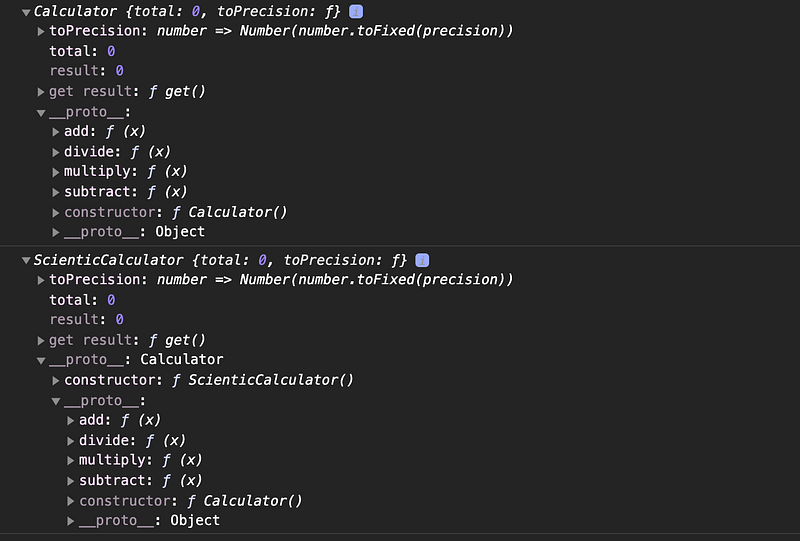
Below is an example of how to implement a calculator using the constructor function and prototype manipulation instead of a class. It is for sure more robust and complex which makes you appreciate javascript class even more but it does allow you more control as long as you know what you are doing.
function Calculator() {
  // total is public because we declared it on the "this"
  this.total = 0;
  // precision is private because is a local variable/constant
  const precision = 2;
  // to precision is a public function expression with access to
  // private properties
  this.toPrecision = (number) => Number(number.toFixed(precision));

  // create a getter for the property "result"
  Object.defineProperty(this, 'result', {
    get() {
      return this.total;
    }
  })
}

// create a static member
// only available on Calculator. It cannot be inherited
Calculator.PI = 3.14;
// prototype methods
Calculator.prototype.add = function(x) {
  this.total += this.toPrecision(x);
}
Calculator.prototype.subtract = function(x) {
  this.total -= this.toPrecision(x);
}
Calculator.prototype.multiply = function(x) {
  this.total *= this.toPrecision(x);
}
Calculator.prototype.divide = function(x) {
  this.total /= this.toPrecision(x);
}

function ScienticCalculator() {
  // this is equivalent to calling super()
  // when you extend another class
  // it will copy all properties from inside Calculator
  // into ScienticCalculator
  // You can call as many constructor functions
  // to inherit properties from multiple ones
  Calculator.call(this);
}

// make ScienticCalculator extend Calculator
// similar to what happens when you do
// "class Calculator extends ScienticCalculator"
ScienticCalculator.prototype = Object.create(Calculator.prototype);
ScienticCalculator.prototype.constructor = ScienticCalculator;
const calc = new Calculator();
const scientificCalc = new ScienticCalculator();
console.log(calc);
console.log(scientificCalc);
// checks logs below
Decorator Pattern
The decorator pattern is also another way to meta-program similar to the Proxy pattern. As a matter of fact, you can use a Proxy to implement a decorator. It is a simple technique to hijack objects to introduce additional reusable functionalities without having to modify the object or function directly.
There are mainly three methods you can implement decorators through:
- Composition — wrapping an object around another that it inherits from to implement new or changed things to it. This is popularly known as an inheritance in Object-Oriented Programming;
- Object Augmentation — attach or change things directly on the object (monkey patching);
- Proxy Object — intercept and react to object actions and updates in order to alter the data or the result.
Javascript allows you to implement decorators which you can actually try through Typescript or by using the decorator's Babel plugin as it is still in the early steps(proposal). Decorators can be done by manipulating object property definition and descriptors for the desired effect.
Below is an example of how we can use monkey patching to modify the calculator property descriptors to log a message whenever the total is updated or the add method is called. This can be useful for debugging purposes and it is also a common decorator to find in programs.
It does not change the calculator class implementation directly but rather operates on the instance of the class to avoid affect other instances in your program.
// An example with no decorator Support
// through Object Augmentation
function logger(obj, prop, message = 'logger') {
  let x = obj[prop];

  if(typeof x === 'function') {
    obj[prop] = (...args) => {
      console.log(message, ...args);
      x.call(obj, ...args)
    }
  } else if(obj.hasOwnProperty(prop)) {
    Object.defineProperty(obj, prop, {
      get() {
        console.log(message + ' - get:' , x);
        return x;
      },
      set(val) {
        console.log(message + ' - set:', val);
        x = val;
      }
    })
  }
}
class Calculator {
  total = 0;

  add(x) {
    this.total += x;
  }
}
const calc = new Calculator();
logger(calc, 'total', 'total');
logger(calc, 'add', 'add argument');
calc.add(20);
// logs
// add argument: 20
// total - get: 0
// total - set: 20
Composite Pattern
The composite pattern allows you to have a group of objects that are treated the same way with the main objective of composing them in a hierarchical structure much like a tree data structure. Its main advantage or purpose is to allow you to use a collection of many entities as one.
For example, when you interact with your file system you don't think of its many components. All you know is that you are interacting with the file system. As a matter of fact, when I made my video on creating a file system I used this pattern to give users the feeling they are interacting with one thing (the system) but it was actually composed of different parts that are simply implementing the same interface.
When you use React and are creating class components, notice that all of them are implementing the same interface — the Component interface — and you compose these different components to shape your application. By creating and nesting components you are composing your app view.
MV* Frameworks
MV frameworks are also a type of design pattern. I really believe in the proper usage of the MV* patterns when building things. I believe in the separation of concerns, sticking to the pattern, and independence of the parts which are a few of the main benefits of using these patterns.
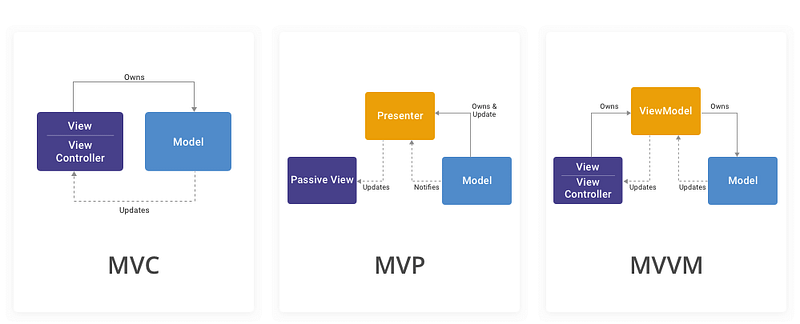
There are a few different types meant to fit different project needs.
- MVC — The Model View Controller lets the data(M) be manipulated by the controller(C) and the data(M) updates the UI(V). The users see the UI (V) and the interactions are handled by the controller(C).
- MVP — The Model View Presenter is a type of MVC. The difference is that the presenter(P) is the middleman. It controllers how they view renders and all the interactions and updates the data(M) accordingly and handles updating the UI with data changes.
- MVVM — The Model View View-Model is probably the most popular and modern and it is the pattern people use in the Frontend the most. It is actually very similar to the MVP in the way that the View-Model talks with the data but the view-model uses data binding and it is more event-driven which means it has no reference to the view and can be tested in isolation. In MVP the Presenter is known by the view and it is a more tightly coupled setup.
- MVA — The Model View Adapter is another variation of the MVC pattern and they pretty much try to solve the same problem differently. The adapter sits in the middle and there is no connection between the model and the view.
Conclusion
There are many patterns when coding that can drastically change the way your program works, scales, and can be maintained.
The patterns can be seen as recipes that if you follow correctly, the chances of you building something great are high. If you ever asked “How do I do this” it is probably a sign you are not aware of patterns and learning patterns levels you up as a developer.
Patterns are also great if you are involved in implementing big solutions or are interested in architecting and designing systems. You can read more about these and many others by reading the Javascript Design Patterns book if you are curious about what else is out there.
There are also other free resources you can learn more from.
Thank you.

Youtube Channel: Before Semicolon Website: beforesemicolon.com