
 By Elson Correia
Everything you need from the section tag to the header tag
One thing that developers who don’t know better often shove aside is semantics in HTML. Semantics is one of the most important features of HTML5 and should be mastered by any web developer.
The most popular video on my YouTube channel is “When to use Section vs Article vs Div in Html?” and it made me realize how many developers out there are trying to understand the meaning behind these tags as they enter the web development industry. Because of that, I decided to put it all in one article in simple words.
1. section
The [section](https://developer.mozilla.org/en-US/docs/Web/HTML/Element/section) tag groups content of a part of the page (document) that makes sense together and must almost always have a heading (a title). The section is like a slice of a pie if the page is the pie. All the sections and parts of the page together help the page make sense, the content of the section makes sense together, and the section itself helps the page make sense as a whole.
There are many other tags that group part of the page, like the nav, article, and aside tags. The section tag should be used if there is no other, more specific semantic tag available.
<section>
  <h2>Welcome to the Before Semicolon</h2>
  <p>Millions of people rely on this space to save and discover the best articles, stories and videos on the web.</p>
  <img src="path/to/some/hero/image" alt="img description"/>
</section>
A section should appear in the outline of the document and can be used for things like search results, page hero, group post categories, etc. If you use the section tag without a title, it won't appear in the outline. Besides, a titled section is good for SEO and accessibility. Untitled sections are common in web applications rather than websites, and in case you want the section to appear in the document outline and not be visible to the user, you can make the title hidden.
<section class="secondary-menu">
  <h2 class="hidden">Controls</h2>
  <button class="reply">Reply</button>
  <button class="reply-all">Reply to all</button>
  <button class="fwd">Forward</button>
  <button class="del">Delete</button>
</section>
2. article
The [article](https://developer.mozilla.org/en-US/docs/Web/HTML/Element/article) tag follows all the rules of a section tag. It must have a title and the content should make sense together. What makes it different is that its content should be standalone content that is independent of the rest of the page.
A great example of this is a job post. If I write a job post and make it available on the LinkedIn website, the same job post can be shown on any other job-seeking website and still not need the rest of the page content to be understood. Because of this property, we say the job post article is standalone content.
<article class="forecast">
    <h1>Weather forecast for Boston</h1>
    <article class="day-forecast">
        <h2>03 March 2018</h2>
        <p>Rain.</p>
    </article>
    <article class="day-forecast">
        <h2>04 March 2018</h2>
        <p>Periods of rain.</p>
    </article>
    <article class="day-forecast">
        <h2>05 March 2018</h2>
        <p>Heavy rain.</p>
    </article>
</article>
You can nest article tags, but the inner articles should relate to the outer article. A good example of this is a comment on a blog post. You can use an article tag to show comments on a blog post and put them inside the article tag containing the blog post content.
<article class="blog-post">
  <h2>Programming</h2>
  <p>What makes you a programmer is how you approach problems not the number of tools you use.</p>
  <section class="comments">
    <h3>Comments</h3>
    <article class="user-comment">
        <h2><strong>Mark</strong></h2>
        <p>Posted on
          <time datetime="2015-05-16 19:00">May 16</time>
        </p>
       <p>Really great article</p>
    </article>
  </section>
</article>
3. main
The [main](https://developer.mozilla.org/en-US/docs/Web/HTML/Element/main) tag is used to contain or expand on the main topic of the page. It must come once per page, and if more than one is included, all but one should have the hidden attribute.
The main tag is strictly informative and does not contribute to the outline of the document. It should not contain things that repeat on other pages. Its content should be unique and elaborate on the topic of the page.
<main>
  <h1>Apples</h1>
  <p>The apple is the pomaceous fruit of the apple tree.</p>

  <article>
    <h2>Red Delicious</h2>
    <p>These bright red apples are the most common found in many
    supermarkets.</p>
    <p>... </p>
    <p>... </p>
  </article>

  <article>
    <h2>Granny Smith</h2>
    <p>These juicy, green apples make a great filling for
    apple pies.</p>
    <p>... </p>
    <p>... </p>
  </article>
</main>
Browsers often look for the main tag to put together the reader's view. That means that you can put your article tag or the various sections of the page inside the main tag as what the page is all about. This detail is so important and goes to show that other things like the page footer, nav, and site logo are all secondary and should exist outside of the main tag.
4. aside
The [aside](https://developer.mozilla.org/en-US/docs/Web/HTML/Element/aside) tag should contain content that relates to the main tag’s content. Let's say the main tag’s content has an article about a travel destination. You can use the aside tag to show related facts about the destination or travel costs that the user can snack on quickly.
<p>Salamanders are a group of amphibians with a lizard-like appearance, including short legs and a tail in both larval and adult forms.</p>
<aside>
    <p>The Rough-skinned Newt defends itself with a deadly neurotoxin.</p>
</aside>
<p>Several species of salamander inhabit the temperate rainforest of the Pacific Northwest, including the Ensatina, the Northwestern Salamander and the Rough-skinned Newt. Most salamanders are nocturnal, and hunt for insects, worms and other small creatures.</p>
You can put the aside tag inside other tags like articles, sections, and even the main tag. The only exception is the address tag. This is because it is a complementary tag and can be used as a sidebar or call-out box.
5. header
The [header](https://developer.mozilla.org/en-US/docs/Web/HTML/Element/header) tag defines the introductory content, and as a non-sectioning content tag, it does not show on the page outline. This means it can be used inside an article with the article title and posted date, inside the body with the side logo and navigation, inside an aside tag with a search form, inside a nav or section tag with the nav title, etc.
<article>
  <header>
    <h2>The Planet Earth</h2>
    <p>Posted on Wednesday, <time datetime="2017-10-04">4 October 2017</time> by Jane Smith</p>
  </header>
  <p>We live on a planet that's blue and green, with so many things still unseen.</p>
</article>
The is the tag that handles the introduction of the section that contains it. Because of this, it can go inside other semantic sectioning elements (except for the footer). It should also not be nested or exist more than once inside a sectioning tag.
6. nav
The [nav](https://developer.mozilla.org/en-US/docs/Web/HTML/Element/nav) tag is a special sectioning tag. It should contain navigation details for the current or another page. It can be titled and used for the main page navigation, table of contents, indexes, breadcrumbs, etc.
<nav class="main-nav">
  <ul>
    <li><a href="/blog">Blog</a></li>
    <li><a href="/contact">contact</a></li>
    <li><a href="/about">About</a></li>
  </ul>
</nav>
In case you want a secondary menu, you should use the section tag. Links inside the footer do not need to be inside the nav tag unless it is clearly labeled to make it distinct. Although most people use it to contain links inside an unordered list, you can also write down navigation prose to provide direction and more context of what the links are all about.
<nav>
  <h2>Navigation</h2>
  <p>You are on my home page. You can check awesome articles i write in <a href="/blog">my
  blog page</a>
  ...
</nav>
7. footer
The [footer](https://developer.mozilla.org/en-US/docs/Web/HTML/Element/footer) tag is often used as the page footer, but it can actually go inside any content flow tag except the header and address tags. It cannot be nested as well, and that means that you can use it for the main content, article, section, and more sectioning tags.
<article>
  <h1>How to be a wizard</h1>
  <ol>
    <li>Grow a long, majestic beard.</li>
    <li>Wear a tall, pointed hat.</li>
    <li>Have I mentioned the beard?</li>
  </ol>
  <footer>
    <p>© 2018 Gandalf</p>
  </footer>
</article>
Footer content normally links, author information, copyright details, notes, etc. For an article, you can use it to display details about the author. For the page, use it for copyright and more links related to the page. The section, it can contain links related to the section or some fine print as extra information.
<footer>
  <p>copyright Before Semicolon. All rights reseverd.</p>
</footer>
Although is often used as such, the footer tag is not a section content tag. That simply means it does not group content that relates to each other and does not show up in the page outline.
Note: The *nav*, *aside*, *section*, *article*, *header*, and *footer* tags are all considered semantic sectioning elements.
8. figure and figcaption
The [figure](https://developer.mozilla.org/en-US/docs/Web/HTML/Element/figure) and [figcaption](https://developer.mozilla.org/en-US/docs/Web/HTML/Element/figure) tags are used to contextualize content that can be images, illustrations, code snippets, diagrams, quotations, poems, etc. Because of its name, developers normally associate the figure tag with a way to add captions to some imagery, but it can be used for more than that.
<figure>
  <figcaption>How to find average value</figcaption>
  <pre>
   const average = (nList) =>
      (nList.reduce((avg, n) => avg + n, 0)) / nList.length;
  </pre>
</figure>
The figcaption the tag may be excluded, but it is recommended. You can also have multiple figcaption tags, but only the first is used as the caption for the content.
9. heading
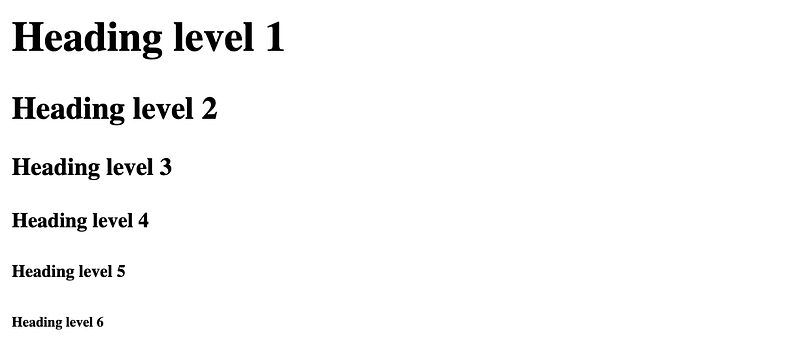
The [heading](https://developer.mozilla.org/en-US/docs/Web/HTML/Element/Heading_Elements) tags consist of h tags numbered 1 through 6 that should be used to define a section’s level of content that can be used to build a table of contents by user agents. It should describe the purpose of the content like a section title would.
It is an accessibility - and SEO-friendly tag that shows in the outline of the page. It should not be nested but can be used in the nested section to define content hierarchy. It is considered best practice to have a single h1 per page, which is very beneficial for screenreaders and SEO even though some search engines try their best to not be affected by it.
<h1>Heading level 1</h1>
<h2>Heading level 2</h2>
<h3>Heading level 3</h3>
<h4>Heading level 4</h4>
<h5>Heading level 5</h5>
<h6>Heading level 6</h6>
There are a lot of ways to mess up the usage of these tags, and one of a few mistakes developers make is skipping a level (e.g. starting from h2). Another mistake is to use it for text size reasons instead of using the CSS font-size. Using multiple h1 tags should be done carefully and doing so kind of implies that the page has multiple purposes or descriptions, which calls for a page split altogether.
10. strong and em
The [strong](https://developer.mozilla.org/en-US/docs/Web/HTML/Element/strong#%3Cem%3E_vs._%3Cstrong%3E) and [em](https://developer.mozilla.org/en-US/docs/Web/HTML/Element/strong#%3Cem%3E_vs._%3Cstrong%3E) tags are used to give the text some level of importance or relevant meaning.
The [strong](https://developer.mozilla.org/en-US/docs/Web/HTML/Element/strong) tag means important, urgent, and serious, and it is often rendered bold, which may confuse developers on when to use it vs. the b tag. The b tag has no semantic meaning and should be used when all you want is to make the text bold. The strong tag has meaning and should be used to show the user that the piece of text is important. It comes with the bonus of making text bold.
<p>Before proceeding, <strong>make sure you put on your safety goggles</strong>.</p>
The [em](https://developer.mozilla.org/en-US/docs/Web/HTML/Element/em) tag is similar to the strong tag and should be used to emphasize the text. The typical “I love programming” vs. “I love programming” conveys a huge difference in emphasis. Emphasizing what you love and how you feel about something are two different things. The browser renders an em tag content as italic, which can also be accomplished with the i tag, but the i tag has no semantic meaning. It is just for styling.
<p>
  In HTML 5, what was previously called
  <em>block-level</em> content is now called
  <em>flow</em> content.
</p>
Screen readers and search engines treat these with extra care vs. their style-purpose counterparts. There is a huge difference between something that is bold or italic vs. something that is bold or italic because it conveys more meaning.
Conclusion
It is always good to use things as they are intended to be used. When it comes to HTML, it is best to follow best practices and keep yourself constantly in the learning loop. Semantics is the best feature of HTML5 and one any web developer should be familiar with and comfortable with.
50 HTML Best Practices & Guidelines to Build Better Web Projects *I have shared different 50 lists of best practices for CSS and Javascript and is part of the before semicolon doing so. This…*beforesemicolon.medium.com

YouTube Channel: Before SemicolonWebsite: beforesemicolon.com